
SEO & AI SEO
November 8, 2026

SEO & AI SEO
16 min read


CSO & Co-Founder at Explore Agency
Bohdan (Bo) leads strategy at Explore Agency, where he and his team develop growth systems for businesses in the home services, healthcare, and legal sectors. Their work centres on helping organizations achieve more predictable and profitable growth.
Book a Discovery CallEvery service business owner eventually asks "how to get more google reviews?", the answer comes down to three decisions: when to ask, how to ask, and how to automate the system. Ask every customer after every completed job, never filtering by who seemed satisfied first. That steady cadence improves your map pack position and drives more inbound calls, as the local SEO for service businesses framework explains.
Your HVAC company sits at 4.1 stars with 47 reviews. The competitor across town has 4.3 stars and 203 reviews, and they own the local pack in both neighborhoods. The gap is not about service quality. It is about the system they built to collect reviews consistently, and the one you have not built yet.
A click from the local map pack costs nothing. A click from a Google Ads campaign costs whatever the market demands, and in competitive home-services markets that number rises every year. When a review-driven map pack listing generates the same inbound call as a paid ad, the economics are hard to ignore.
The question of how to get more Google reviews for your business splits into two parts: how many you need and how fast they come in. Star rating and review velocity are two separate levers, and both matter. Figuring out how to get more reviews on google requires working both levers simultaneously, because confusing them leads to tactics that look busy but do not move the needle.
Star-rating thresholds and what they mean for the map pack:
Ratings below 4.0 typically hurt click-through in competitive local markets; the 4.4-and-above range is where the strongest conversion signals cluster. The exact cutoffs vary by market and category, but the direction is consistent: a higher rating improves the likelihood that someone clicks your listing over a competitor's, and the gap between a low rating and a strong one is not cosmetic.
Review velocity versus review total:
A competitor who adds ten reviews per month over six months does not just have more reviews than a business that collected fifty reviews in a single push. They also outrank it. Google weights recency alongside total count in its local algorithm; a steady drip of new reviews signals an active, relevant business in a way that a one-time burst does not.
Star rating is a conversion input: it determines whether someone clicks. Review velocity is a ranking input: it determines whether you appear. Neither alone is enough to own the local pack. A business with a 4.6-star average and no recent reviews loses to a competitor at 4.1 stars who added fifteen new ones last month.
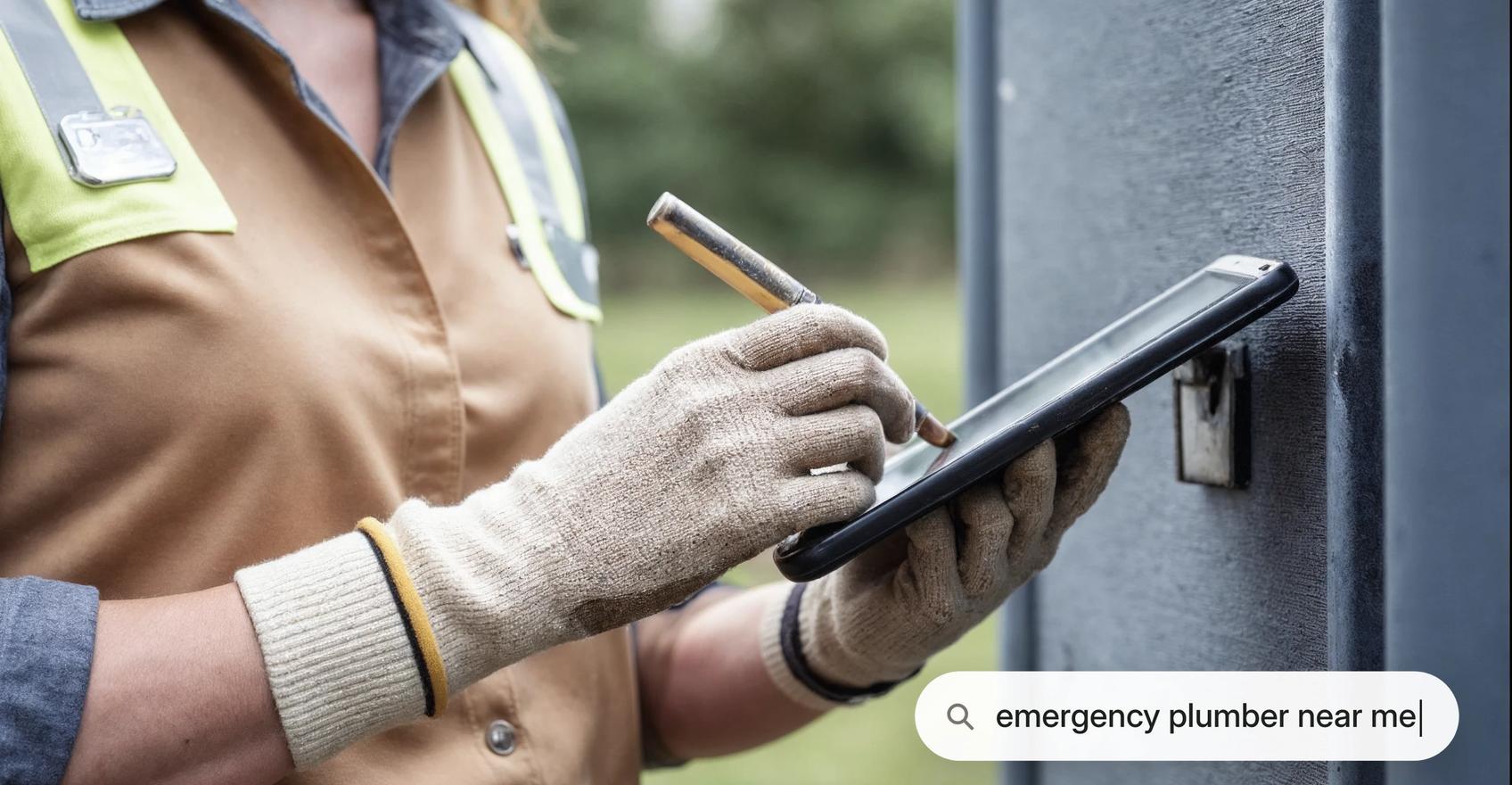
The ask window is measured in hours, not days. The optimal moment differs by trade, but the underlying principle is consistent: ask at the emotional peak, when recall is highest and the customer's relief is fresh.
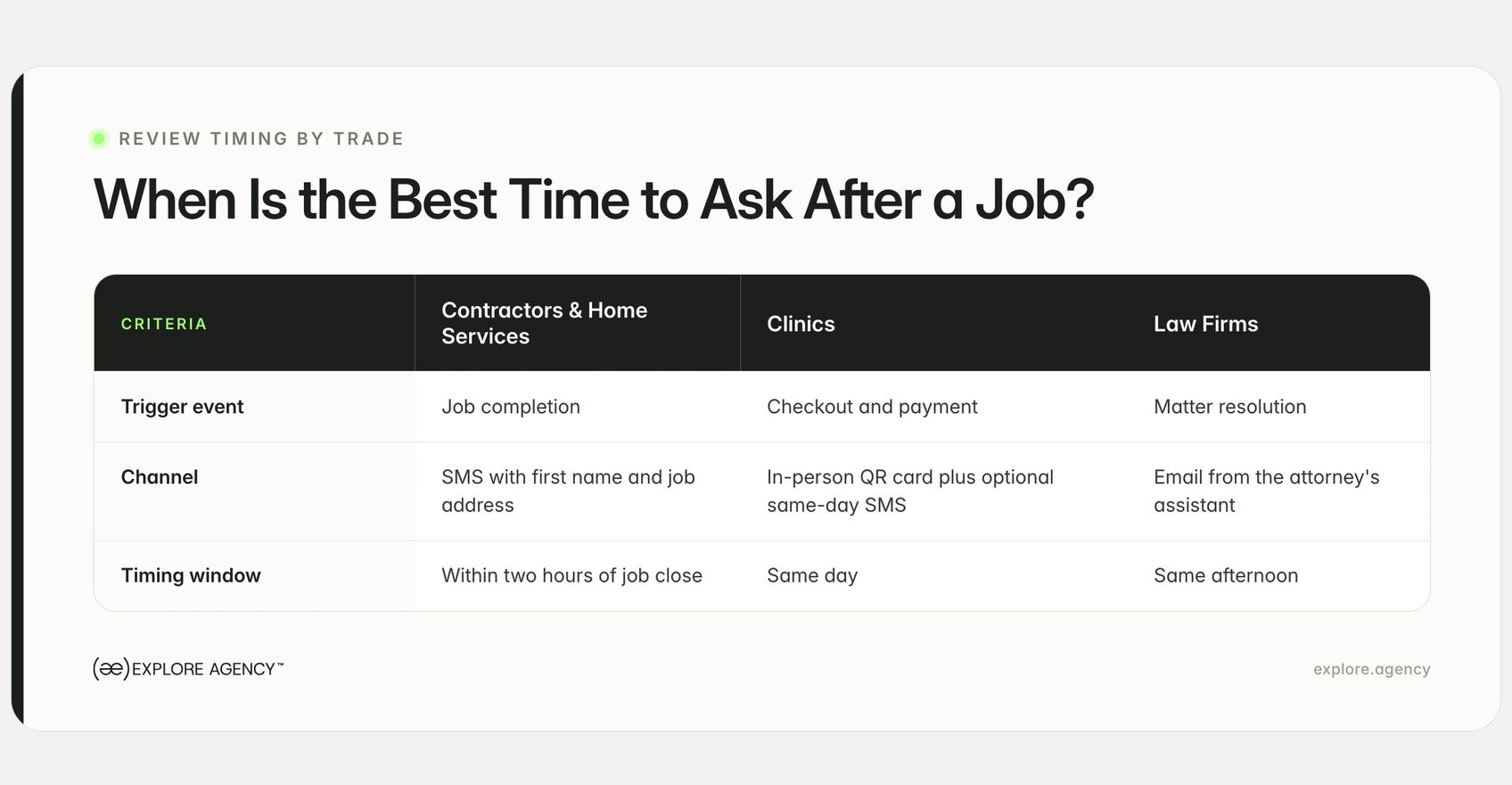
A roofer's foreman finishes a job, says "Great working with you," and three days later sends a review link. The homeowner already forgot his name. Every generic guide says "ask within 24 hours" but no guide explains what that actually means for a contractor, a clinic, or a law firm. Here is what it means.
The job-site moment produces significantly higher response rates than a cold follow-up 72 hours later. The ask that lands is the one sent before the truck reverses out of the driveway.
A text message sent the moment a job is marked complete, referencing the customer's first name and the job address, outperforms any follow-up email because context is immediate. The foreman can reinforce it verbally as a natural handoff: "You'll get a quick text from us. Means a lot if you have 60 seconds." That verbal cue reinforces the ask and raises the likelihood of follow-through, and the written follow-up arrives within minutes.
Knowing how to get more Google reviews for contractors is primarily a timing question. The window is narrow and closes fast. Miss it, and the follow-up two days later reaches a homeowner who has moved on to the next problem on their list.
The front-desk payment moment is the highest-recall point in a patient visit. A follow-up email sent that evening competes with everything else in the inbox; the checkout window has the patient's full attention.
The ask placed there converts better for a straightforward reason: the experience is freshest. The HIPAA guardrail is simple but essential: the ask must never reference the reason for the visit, only the patient's experience with the team and the office. A laminated QR-code card at the payment terminal removes the friction. The dental receptionist keeps one next to the tap-to-pay reader. The patient taps to pay, the receptionist says one line: "Mind if I send you a link to leave us a quick note?" The card is already there if they prefer to scan.
For clinic owners whose first search was "how to get more reviews for my clinic on google," the checkout station is the answer. No follow-up sequence replaces the moment when the patient is standing at the front desk with the visit still fresh.
The attorney's assistant sends one email the afternoon a matter resolves, when the client's relief is at its peak. Not a week later, when the relationship feels closed and the momentum is gone.
The framing matters. "It was a privilege working with you, and if you have 60 seconds, here is where you can share your experience" reads as genuine gratitude rather than a survey obligation. A personal injury client calls their attorney the morning after a settlement lands; that afternoon is the window. Send the email that afternoon, not the following Monday. The ask that lands reads as a natural extension of the relationship, not an administrative task.
Ask-timing checklist by vertical:
The ask that lands is personal, brief, and timed to a moment of relief rather than obligation. Generic "please leave us a review" messages read as automated and are easy to ignore. A specific reference to the job or the relationship makes the same request feel like a genuine follow-up.
Owners who search "how to get more reviews on google my business" quickly find that the platform is not the variable, tone and timing are. The difference between a request that converts and one that gets ignored usually comes down to a single word: specific versus generic.
Contractor text message:
"Hi {first name}, thanks for having us out to {address} today. If you have a minute, a Google review helps us a lot: {link}. No pressure either way."
Front-desk verbal script:
"Before you head out, we'd really appreciate it if you shared your experience online. I can send you a quick link by text if that works for you."
Law firm email:
"It was genuinely a pleasure working with you on this matter. If you have a moment, a brief note on Google would mean a great deal to the team: {link}."
Each script is under three lines. None uses survey language. The request is personal, the channel matches the relationship, and the ask is timed to the right moment. That is what makes it feel like a genuine request rather than an automated form.
Manual follow-up does not scale. A three-truck HVAC company might complete a dozen jobs on a busy day; asking a service manager to send review requests at the end of each one produces inconsistency at best and nothing at worst.
The more reliable system: the "job completed" stage in your field-service CRM fires the review request automatically. A ServiceTitan job hits "Completed" at 2:47 pm, and the SMS arrives at 2:49 pm, before the technician has reversed out of the driveway. That timing is not a coincidence. It is a workflow trigger that runs every time, without anyone on the team thinking about it.
CRM platforms and trigger events:
One-time setup replaces ongoing manual outreach. For businesses already running any of these platforms, the review request is not a new tool. It is a workflow rule added to software you already pay for. That is the most practical answer for owners asking how to get more Google reviews from customers at scale without adding overhead to the team.
The result is a review request that goes to every customer, every time, at the moment when they are most likely to respond. That consistency is what builds the monthly cadence that review velocity requires, and what separates a business at 203 reviews from the one still sitting at 47.
A business sitting at 3.7 stars after one bad season faces a specific problem: visibility shrinks even when the work is good. The recovery is a volume play, not a reputation-spin exercise. No amount of carefully worded responses to old negative reviews will move the star rating. Only new five-star reviews do that.
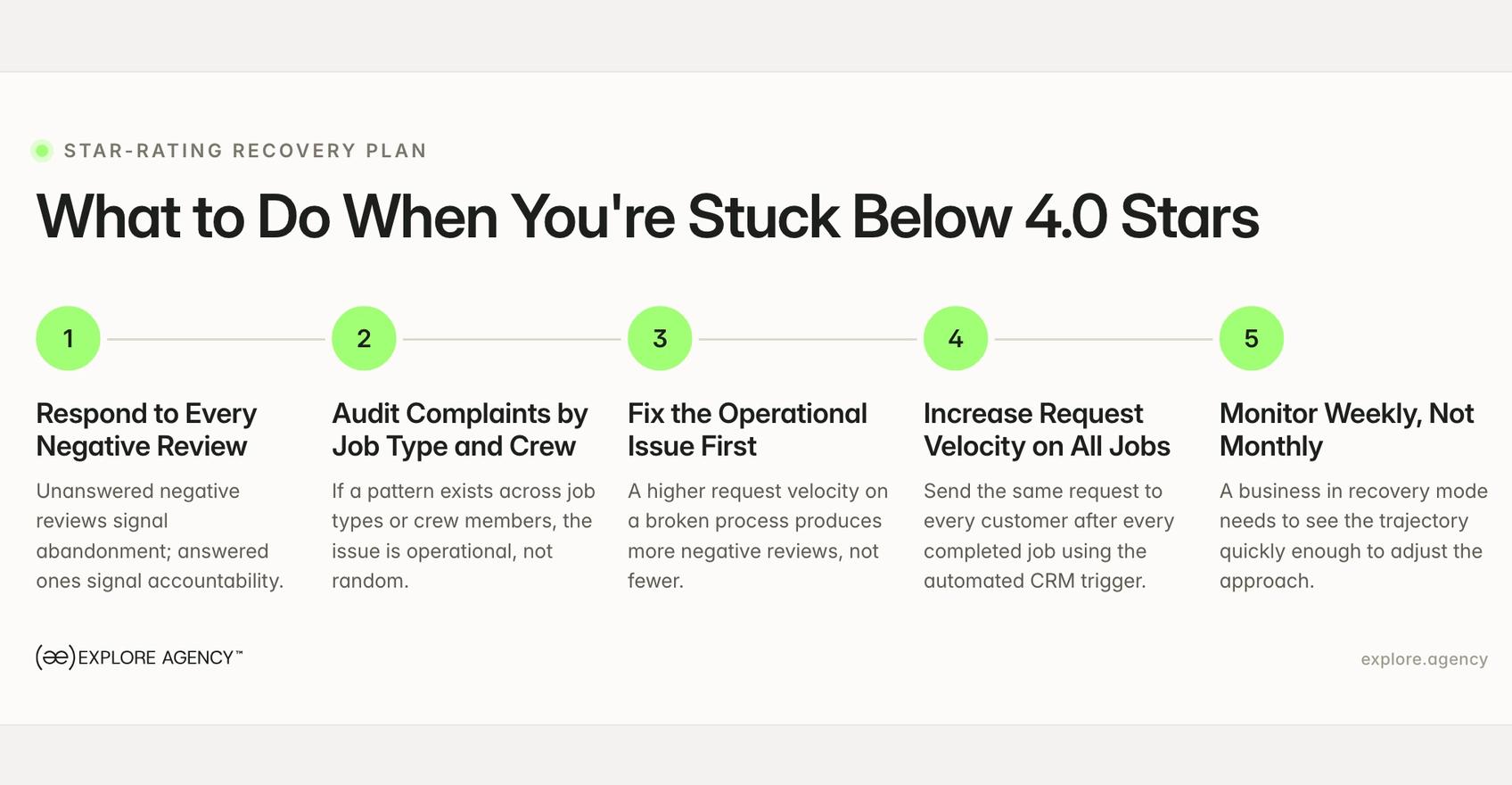
The math is straightforward: calculate your current weighted average, then work out how many five-star reviews are needed to cross the 4.0 threshold. The number is real, and the only way to hit it is with a higher-velocity request system than you have been running.
Five-step recovery checklist:
The most common mistake at 3.7 stars is trying to dispute or bury the negative reviews rather than outpacing them with volume. Disputes take weeks and rarely succeed unless a review is demonstrably fake. Volume is the faster path and the only sustainable one.
Response rate is a secondary local engagement signal. The more measurable effect is on conversion: a listing where the owner responds to every review, including negative ones, communicates active management. Callers notice before they dial.
The response does not need to be long. It needs to be specific.
Three-line positive review response template:
Example: "Thanks, Sarah. Really glad the installation team got everything sorted for you on the patio project. We'll be here whenever you're ready for the deck."
Two-step negative review response template:
The goal is not to win the argument in public. The goal is to show every future customer who reads that review that the business takes feedback seriously and responds. That signal is worth more than the negative review costs, because the next caller reads both the review and your response before deciding whether to dial.
Get Started
We help businesses turn strategy into measurable growth through better positioning, websites, paid media, SEO, and AI systems. Let’s look at what’s holding growth back and what to fix first.
The line between a legal ask and a policy violation is simpler than most guides suggest. Asking is legal. Filtering is not.
Google's review policies require that you treat every customer equally in the review-request process. Send the same request to everyone who had a completed job, regardless of whether you expect a five-star response or a two-star one. The moment you route unhappy customers away from Google and direct satisfied ones to leave a review, you are in violation territory. Google documents these requirements in its review policies for Google Business Profile.
Five things that violate Google's review policies:
Asking is legal. Filtering is what triggers enforcement. Google's policies explicitly prohibit review gating: showing unhappy customers a private feedback form while directing satisfied customers to Google, so only positive reviews get published.
The practical risk is not theoretical. Google can remove reviews identified as obtained through gating practices, and repeated policy violations can result in listing suspension. The compliant path is simpler: send the same review request to every customer after every completed job, with no filtering step in between.
Fake reviews from competitors are a documented pattern in competitive trades, particularly in home services and legal. Knowing the reporting path matters as much as knowing how to collect reviews.
Step-by-step: how to flag a fake review in Google Business Profile:
Google acts on policy violations: fake identity, conflict of interest, spam. It does not remove reviews simply because they are negative or because the business disagrees with the content. Knowing this distinction before filing a report sets realistic expectations and saves time.
When owners reframe "how to get more google reviews for my business" as a revenue question rather than a reputation question, the system gets the priority it deserves. The economics close like this: more reviews at higher velocity move your business up in the local map pack. A higher map pack position produces more profile views. More profile views produce more inbound calls. More inbound calls, with a consistent intake process, produce more booked jobs.
This is why how to get more Google business reviews is not just a reputation management question. It is a revenue question. Owners who treat it as such run the system consistently and see the results in their call log.
The measurement problem is where most service businesses lose the thread. An owner who sees more calls coming in but cannot connect those calls to specific reviews, specific map pack positions, or specific marketing activities cannot scale what is working. The review system is one input into the local search equation; the booked job is the output. The gap between them is attribution, and attribution is what makes it possible to invest confidently instead of guessing.
For home-services businesses, the review system works in direct relationship with the rest of your local search infrastructure: your Google Business Profile completeness, your website's local landing pages, your citation consistency, and your review velocity working together. The Drain Express engagement is a useful reference point for how that integrated local system operates in a competitive trade market. The case study details are at Drain Express on explore.agency.
Treating reviews as an isolated tactic rather than part of a measured system is the reason the cadence stalls after the first push. Explore Agency integrates review performance with paid media, website conversion, and local SEO into one system tracked to booked jobs. That is the only way to know whether the review investment is working, and the only way to scale it confidently.
Set up an automated review request in your CRM (Jobber, ServiceTitan, Jane App) to trigger at the "job completed" stage. The ask goes to every customer without anyone on your team following up individually. One-time setup replaces ongoing manual outreach.
There is no fixed number; Google weights recency and velocity alongside total count. A business with reviews added consistently in the last 90 days can outrank a competitor with a larger total from three years ago. Consistent monthly additions outperform a one-time push.
Google confirms that responding to reviews is a local ranking signal at the engagement level and signals active profile management. The more measurable effect is on conversion: listings where the owner responds to every review, including negative ones, see higher call-through rates from the map pack.
Yes. Offering discounts, gift cards, or any compensation tied to leaving a review violates Google's review policies and can result in review removal or listing suspension. Asking every customer for an honest review with no conditions attached is permitted.
Review gating means routing unhappy customers to a private feedback form while directing satisfied customers to Google, so only positive reviews get published. Google's policies prohibit it because it produces a misleadingly positive public rating. The compliant approach is to send the same review request to every customer after a completed job.
Explore Agency runs paid media, web and SEO as one integrated system — with revenue tracked to real booked jobs.
Articles
SEO & AI SEO
November 8, 2026